CVShuffle - Shuffle Tracking
 Shuffle Tracking & Ace Sequencing Software
- CVShuffle is a set of additions to Casino Vérité
Blackjack in support of both shuffle tracking and Ace Sequencing (Ace
Prediction) practice and analysis. CVShuffle is a separate product
that requires CVBJ Version 3. A demo is included with CV Blackjack.
Blackjack Shuffle tracking is an extension to card counting. But with
Shuffle Tracking, not only do you count cards as they go by, but you also
take note of the location of large numbers of large or small cards in
the discard tray to determine or control their location in the next shoe.
Not all shuffles are 'trackable.' CVShuffle includes aides to determine
the 'trackability' of shuffles as well as practice aides and tools to
help beginners understand the concepts. However, beginners will need additional
instruction. Arnold Snyder's Shuffle Tracking Cookbook, George
C's Shuffle Tracking for Beginners and David McDowell's Blackjack
Ace Prediction are good sources.
Shuffle Tracking & Ace Sequencing Software
- CVShuffle is a set of additions to Casino Vérité
Blackjack in support of both shuffle tracking and Ace Sequencing (Ace
Prediction) practice and analysis. CVShuffle is a separate product
that requires CVBJ Version 3. A demo is included with CV Blackjack.
Blackjack Shuffle tracking is an extension to card counting. But with
Shuffle Tracking, not only do you count cards as they go by, but you also
take note of the location of large numbers of large or small cards in
the discard tray to determine or control their location in the next shoe.
Not all shuffles are 'trackable.' CVShuffle includes aides to determine
the 'trackability' of shuffles as well as practice aides and tools to
help beginners understand the concepts. However, beginners will need additional
instruction. Arnold Snyder's Shuffle Tracking Cookbook, George
C's Shuffle Tracking for Beginners and David McDowell's Blackjack
Ace Prediction are good sources.
"The best shuffle-mapping software, however, in my opinion,
is Norm Wattenberg's CVShuffle." - Arnold Snyder
Features
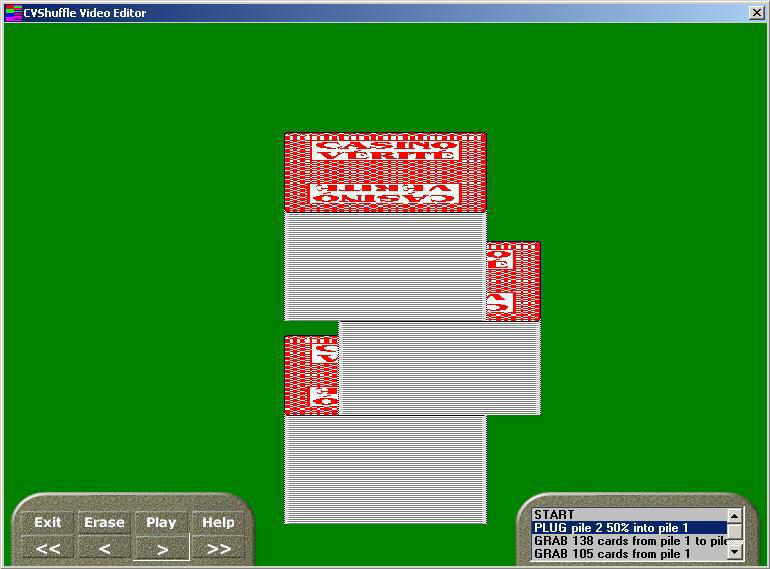
- Shuffle Editor - The shuffle editor
is a VCR like interface used to describe shuffles to the program. It
has VCR controls to forward and backward step through a shuffle and
3D animation support to play a shuffle. You describe the shuffle by
actually performing it yourself with stacks of cards and the mouse.
This ensures that your understanding of the shuffle matches the computer's
understanding. It also allows you to follow the actual shuffle in practice.
- Fine Tuner - The main page
allows fine tuning of a shuffle. Adjustments to the exactness of each
shuffle step can be made here. For example, for each riffle you can
describe how many one, two, three and four card drops are made to simulate
the skill of the dealer.
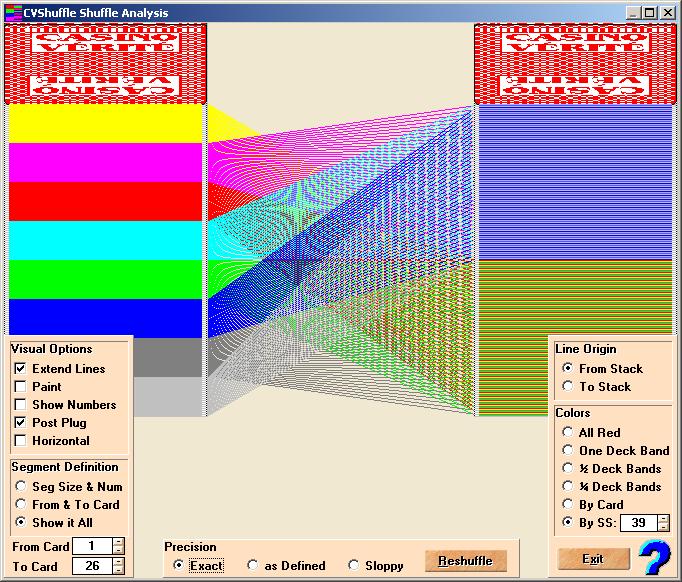
- Shuffle Mapping - The Mapping
tool provides many options to graphically display how the cards in the
discard tray map into the next shoe. Resolution is down to the card
so you can visually determine the exact movement of cards. A shuffle
tracker can dynamically adjust the segment size to instantly see the
effect and quickly narrow down on any weaknesses in the shuffle. You
can also override the exactness of all shuffle steps to instantly see
the effect of dealer sloppiness during the shuffle.
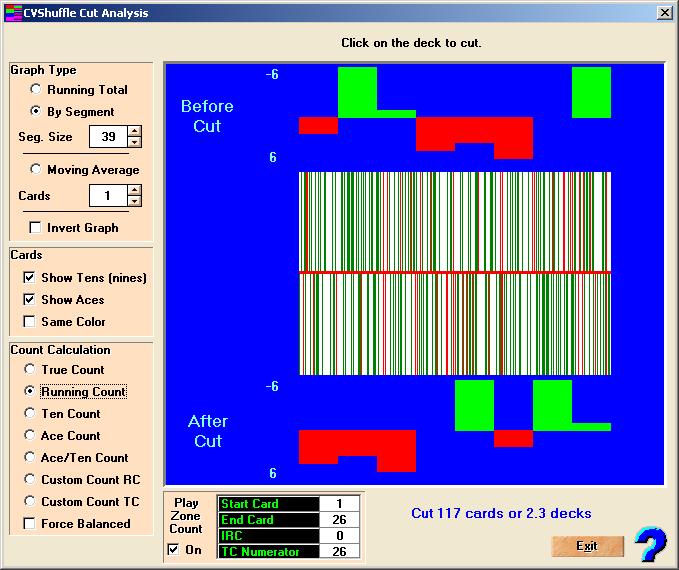
- Cut Analysis - In addition to cutting
the cards at the end of the shuffle, the Cut Analysis screen provides
several options to graphically show the user the exact impact of the
cut.
- Create/Open - This screen supports
maintenance of standard and user shuffles. You can also select two shuffles
and the dealer will randomly chose between them. Shuffles can also be
exported to other users.
- The Shuffle - Much variability can
be designed into a shuffle. The shuffler will attempt to automatically
adjust to unusual circumstances and contains integrity checks to insure
that invalid shoes are never created no matter how sloppy the dealer
is programmed to shuffle.
- Play Zone Count Adjustment -
Shuffle tracking requires more than just knowing where to find the good
cards. After you cut the cards, you can indicate that you want the count
adjusted during the play zone. You specify the location of the play
zone, the initial running count and the zone length for True Count calculations.
CV will adjust its counting accordingly for betting, playing and statistics.
- Practice - When shuffle tracking is
turned on, during CV Blackjack practice the cards are shuffled according
to the selected shuffle(s) instead of randomly. Nearly all of the hundreds
of CVBJ features including different table formats, rules, environment
options, statistics, graphics, charts, playing strategies, betting strategies,
cover play and expert methods are supported. Cards are discarded to
the discard tray by the methods selected and animation of the shoe,
discard tray and card movement is supplied with photo-realistic views
of the discard tray and shoe.
- Pop Ups - During play, you can move
the cursor to the Cards button on the bottom right of the control bar
or to either side of the screen to view pop up displays of shoe and
discard tray contents. You can see the segments and tens and or aces.
By moving the cursor over the pop ups, the magnifier will appear showing
exact ten and ace card locations.
- Card Flow Animation - Discards
are animated to aid the understanding of the flow of cards into the
discard tray.
- Drills - Drills to aid in Shuffle
Tracking and Ace Sequencing are included.
- Ace Sequencing learning and testing
- Practice Ace Sequencing (AKA Ace Prediction) during play. Mark Aces
and keycards to track the movement throught the discard tray, shuffle
and cut and to test your skill at Ace Prediction.
- Nicknames - Aids to help remember
card nicknames for use in Ace Sequencing.
- Analyze Shuffle - Run a shuffle thousands
of times to see the effect on segment maps.
- Analyze Ace Sequencing - Run a shuffle
thousands of times to find areas ripe for Ace Prediction. This will
quickly tell you if a shuffle is trackable or can be used in Ace Prediction.
- Manual - A printed manual is included.
Screenshots
Note: Putting screenshots on the web causes some blurring and color
alteration.
Orders
To order CV products, see the Orders Page.
Downloads
For demo and update downloads go to the Download
Page.
|